
Seeing What Users See—And What They Struggle With
Spoiler Alert
The moment I stepped into Penny Juice’s website, the pain points were hard to miss: confusing navigation, no order confirmation, low-quality visuals, poor contrast, and accessibility tools that didn’t actually support accessibility.
This audit became a deep dive into how small design oversights create big user frustrations. My recommendations reimagined the entire experience—clear product pages, intuitive navigation, accessible design patterns, and a streamlined order flow built for busy childcare providers.

Initial Observation
Penny Juice is a fruit‐juice concentrate company that serves childcare centers and preschools—an audience that needs clarity, trust, and speed when ordering. Their brand aims to feel playful and child-friendly, but the website immediately communicates something different: confusion, clutter, and friction.
My first pass through the site revealed three major red flags:
-
Cluttered visuals and low contrast that strain the eyes instead of inviting interaction
-
A frustrating ordering flow with no product photos, unclear instructions, and no confirmation or feedback
-
Accessibility tools (AudioEye) that exist, yet fail to meaningfully support accessibility
What should feel simple and reliable instead feels outdated, overwhelming, and easy to abandon—putting user trust and customer loyalty at risk.
Plan
Understanding the Experience Through Every User’s Eyes
This project began with a simple question:
What gets in the way when a parent, provider, or first-time buyer just wants to place an order?
Rather than auditing features in isolation, I approached the site the way real people would — with different levels of tech literacy, different expectations, and different mental models.
My evaluation included:
-
A full UX/UI audit across desktop and mobile
-
An accessibility review of AudioEye Web Accessbility Platform features
-
A competitive benchmark analysis
-
A review of real customer complaints and confusion patterns
-
Heuristic and user-journey mapping to reveal universal friction points
This approach allowed me to see beyond “what’s broken” and instead understand why users were consistently getting lost, stuck, or frustrated.
The Problem
A Product Designed for Kids, but a Website That Leaves Adults Struggling
Childcare providers and parents are busy. Their priority is speed, clarity, and confidence when placing large orders.
But Penny Juice’s site works against them:
-
There is no clear navigation structure
-
Users get no confirmation or feedback after placing an order
-
Buttons and labels mislead or redirect unpredictably
-
Colors and imagery strain the eyes and break basic accessibility heuristics
This means the site isn’t just outdated —
it actively erodes trust and creates unnecessary cognitive load.
To succeed, Penny Juice needs a system that supports every user, not just those who are highly tech-savvy or patient enough to troubleshoot their own purchasing experience.
Insights
Through the audit, three clear themes surfaced — all rooted in fundamental UX heuristics and human behavior.
🔍 1. Navigation that worked against the user
People expect predictability and structure online, and the current navigation violates nearly every convention:
-
No shopping cart
-
No order review
-
No account access
-
No way to go back without breaking the flow
These gaps force users into a guessing game rather than a guided journey.
🎨 2. Visual design that overwhelmed instead of orienting
Poor contrast, clashing colors, grainy images, and a single overworked font created a visually chaotic experience.
When visual hierarchy is missing, users can’t form mental models — everything feels equally important and equally confusing.
♿ 3. Accessibility features that existed, but didn’t help
AudioEye tools were present but not thoughtfully implemented:
-
Large text settings broke the layout
-
Buttons meant for dyslexic readers were illegible
-
High-contrast modes solved some problems but highlighted others
Accessibility isn’t a plugin —
it’s an ecosystem of thoughtful interactions.
Dyslexic button for Facebook is not legible. The user would have no idea what this button is

My UX/UI Audit with recommendations highlights the whole order process and a brief review of the navigation with all my recommendations.
Key Findings
Where the Experience Broke Down
Navigation
-
No ability to track or modify orders
-
No confirmation screen
-
No clarity on next steps
Visual & Functional Design
-
Buttons blended into the background
-
Images were too low quality for brand credibility
-
Hover states were unclear or inconsistent
Mobile vs. Desktop
-
Mobile had a more intuitive flow
- Ordering is smoother on mobile, with a clear, concise layout that reduces text clutter and enhances the user’s ability to view flavor selections compared to the desktop view.
-
Desktop lacked a hamburger menu and basic structure
-
Critical information disappeared on smaller screens
Together, these issues created a fragmented and unpredictable experience.

Payment Method Images Misplaced
The icons for payment methods is at the bottom of the screen. On the desktop the contact info is above payment method icons but disabled on mobile. This causes confusion to the user because there is no context for why the icons are there. Additionally everything is crowded and difficult to understand or navigate
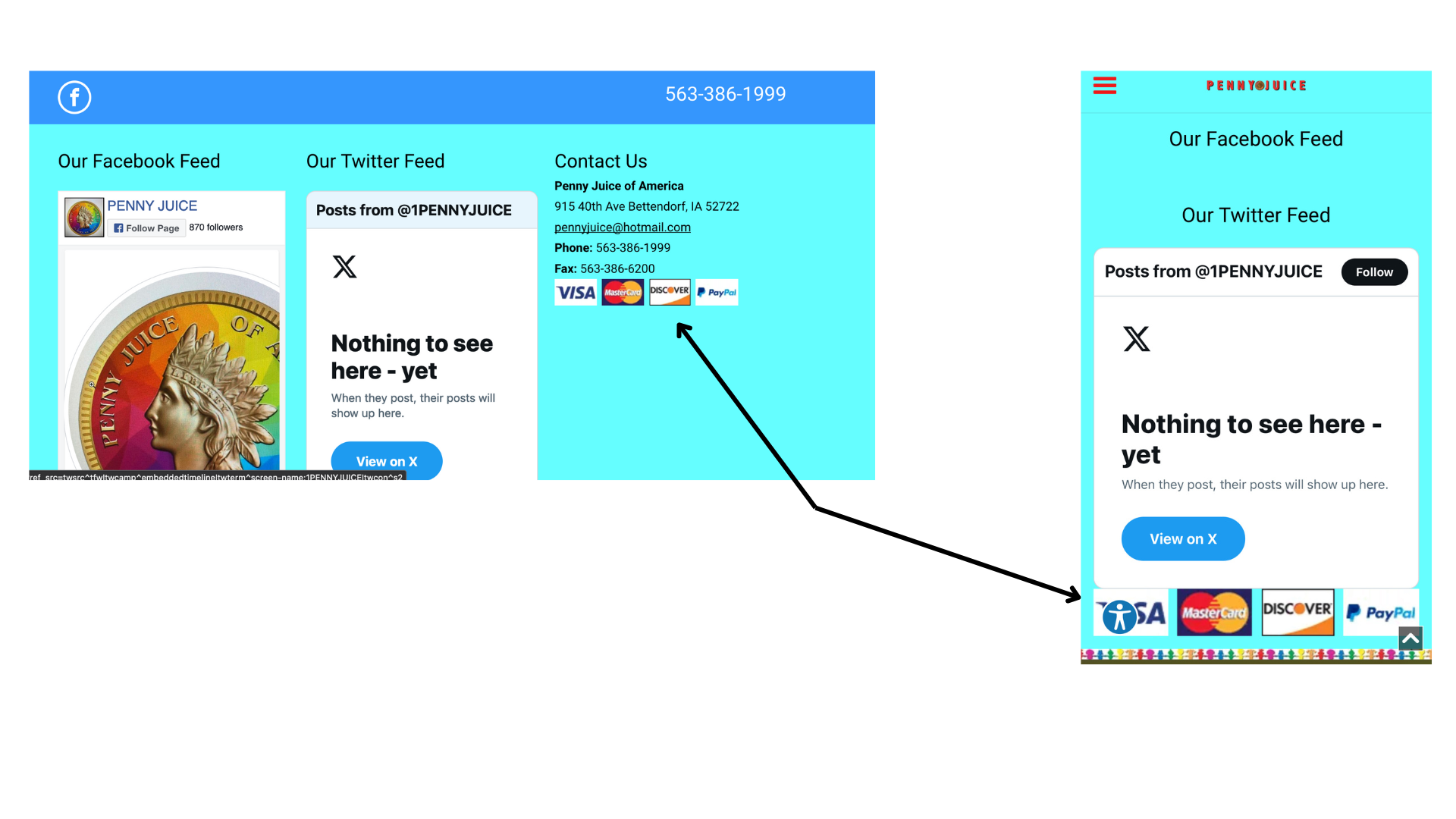
Desktop
Mobile
Accessibility
-
Color contrast failed WCAG standards
-
Mobile views cut off text
-
Essential information became inaccessible in larger text modes


When ordering while using the largest text you cannot see what you’ve ordered once you’ve scrolled down too far down to read the small print
Competitive Insights
Analyzing H&H Products Company revealed an important contrast:
Strengths Worth Emulating
-
Clear product pages
-
Strong navigation patterns
-
Detailed specifications and visuals
-
Interactive tools (profit calculator) that empower users
Weaknesses That Reinforce the Opportunity
-
Broken internal pathways
-
Duplicate pages
-
Flawed cart behavior
-
No visible payment methods
Competitor insight made one thing clear:
Users expect reliability, clarity, and transparency — and Penny Juice is missing all three.
Recommendations
This audit showed that Penny Juice’s biggest opportunity isn’t just a visual refresh —
it’s a chance to rebuild trust.
By addressing the issues identified and rethinking the experience from a human-centered perspective, Penny Juice can:
-
Make ordering intuitive for every user
-
Reduce friction and cognitive effort
-
Build confidence through consistency and clear feedback
-
Stand out in a competitive space where reliability matters
Conclusion/Next Steps
This case study showcases my strength in seeing patterns others miss — translating user frustration into design clarity, and helping businesses create experiences that truly meet people where they are. The next steps forward are to:
-
Move into high-fidelity redesigns informed by these insights
-
Conduct usability testing with actual childcare providers
-
Iterate toward a seamless, predictable, accessible experience